Elin Mod Package
Elin supports a variety of mod types, let's walk through the steps of creating a basic example mod.
Mod Folder
Your locally developed mod should be placed under <ElinGamePath>/Package/<ModName> folder.
If you are not sure where that is, right click Elin in your steam library, go to Properties>Installed Files: 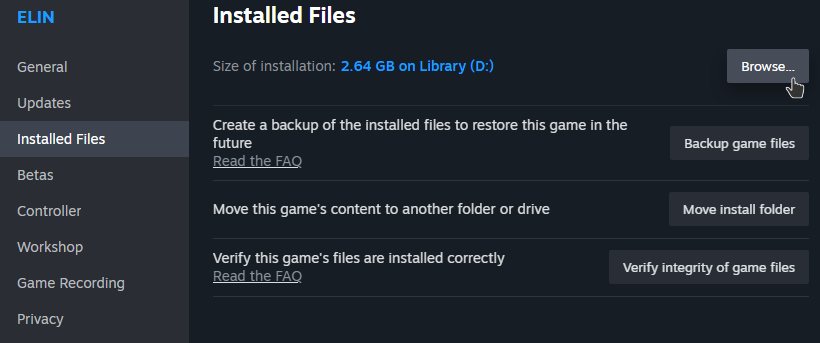
Click Browse and open up the Package folder, this is where local mods are placed, including Elin's own core files. Create a new folder for your mod, all of the mod contents will be placed within. 
Show File Extensions
To proceed and make your life easier, file extensions must not be set to hidden: 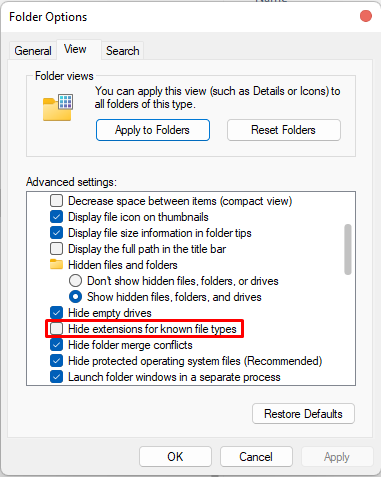
Windows 10
- Open File Explorer; if you do not have an icon for this in the task bar; click Start, click Windows System, and then File Explorer.
- Click the View tab in File Explorer.
- Click the box next to File name extensions to see file extensions.
Windows 11
- Open File Explorer; if you do not have an icon for this in the task bar; click Start, click Windows System, and then File Explorer.
- Click the View dropdown in File Explorer.
- Click the Display option and check file extensions;
Preview / Thumbnail (preview.jpg)
A preview image will be used as the thumbnail in workshop page. It has to be named preview, in .jpg format, and preferably under 1MB in size, otherwise you might encounter upload problem. 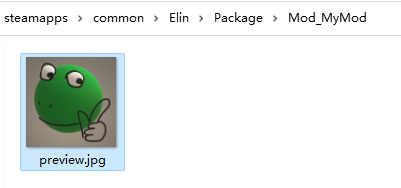
Writing package.xml
A package.xml describes the mod. Create a new text file in the mod folder and change its name and extension to package.xml: 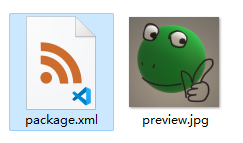
Open it with an editor - not chrome/your browser, and fill in the following information:
<?xml version="1.0" encoding="utf-8"?>
<Meta>
  <title>My Elin Mod</title>
  <id>my.veryunique.modid</id>
  <author>Me</author>
  <loadPriority>100</loadPriority>
  <version>0.23.50</version>
  <tags></tags>
  <description>
  </description>
  <builtin>false</builtin>
</Meta>title
Your mod title. Enter your mod's title within this tag. When you upload your mod to the Workshop for the first time, the text in this tag will be displayed as the mod's title.
When updating your mod, this text will be ignored. If you need to change the title, please do so directly in the Workshop.
Example: <title>My Elin Mod</title>
id
Enter a unique ID to identify your mod. If the ID conflicts with an existing mod, the upload will fail. Choose a name unlikely to conflict with others.
Example: <id>my.veryunique.modid</id>
Updating Mod
Do not change the id of the mod once you publish it. Otherwise it will be treated as a new mod and fail to update.
author
Enter the name of the author. You can write anything here.
Example: <author>Me, Myself, and I</author>
loadPriority
Specifies the default order in which mods are loaded. Enter any number, mods with lower numbers are loaded first. The value is clamped to -999 ... 999, and anything that is not a number falls back to the default 100.
loadPriority only decides where a mod lands the first time the game sees it. As soon as the mod is listed in loadorder.txt - which happens the moment you reorder or toggle mods in the Mod list - the saved order wins instead.
Example: <loadPriority>100</loadPriority>
version
Write the version of the Elin main game that your mod was last confirmed to work with. Currently, it’s okay to skip frequent updates to this value unless necessary. If the Elin main game introduces significant changes to mods, mods with versions older than the main game’s update will no longer be loaded.
WARNING
This is not your mod's version! Set this version to your game's version.
Example: <version>0.23.212</version>
tags
Specify tags for the Workshop, separated by commas(,) if multiple tags are used. You may register any tags you like. Using official tags will make your mod visible in the Workshop categories.
Example: <tags>General,QoL,Utility,My Fun Mods,Use With Caution</tags>
description
Provide a description of your mod. This text will be displayed as the mod's description when it’s first uploaded to the Workshop.
When updating your mod, this text will be ignored. If you need to change the description, do so in the Workshop.
Example: <description /> you should do this in workshop page.
builtin
Set this to false. Don't worry about it. Don't think about it.
Example: <builtin>false</builtin>
optional: visibility
Specifies the visibility of the uploaded mod. Possible values are:
PublicUnlistedPrivateFriendsOnly
If this tag is omitted, the mod will be uploaded as Public by default.
Example: <visibility>Unlisted</visibility>
optional: dependency
Declares another mod that has to be loaded before yours. The target mod's id goes into the id attribute - text written inside the element is ignored.
<dependency id="dk.elinplugins.customwhateverloader" />- Ids are trimmed and matched case-insensitively, so
id=" Foo.Bar "andfoo.barare the same mod. - Several ids in one attribute, separated by commas(
,), mean any one of them is enough:<dependency id="mod.a,mod.b" /> - Repeat the element when you need all of them:xml
<dependency id="mod.a" /> <dependency id="mod.b" /> - A dependency also implies
loadAfter: the target is sorted before your mod automatically. - When the requirement is not met your mod is not loaded, and the Mod list shows what is missing.
Do not depend on builtin packages
Builtin packages (_Elona, _Lang_Chinese, _ModdingKit, Mod_Slot) can not be used as a dependency target - your mod would never load.
Example: <dependency id="dk.elinplugins.customwhateverloader" />
optional: incompatible
Declares mods that must never be loaded together with yours. Same syntax as dependency.
<incompatible id="some.other.mod" />- The declaration works both ways - only one of the two mods needs to declare it.
- The mod that loads first wins, the other one is blocked and the Mod list shows which mod blocked it.
- Declaring your own id is ignored, and so is declaring a builtin package.
loadAfter/loadBeforebetween two incompatible mods have no effect.
Example: <incompatible id="mod.a,mod.b" />
optional: loadAfter / loadBefore
Ordering hints. Unlike dependency they never stop a mod from loading.
<loadAfter id="mod.that.loads.first" />
<loadBefore id="mod.that.loads.later" />- Same
idattribute syntax asdependency(comma separated, repeatable). - Targets that are not installed are ignored, so it is safe to point at optional mods.
- Builtin packages can not be used as a target.
Example: <loadAfter id="dk.elinplugins.customwhateverloader" />
Upload & Update
That's it, a basic empty mod that does nothing has been created. Launch Elin and open the Mod Viewer page, find your mod, it should be loaded as [Local] because it's a local mod in the Package folder.
Click your mod and you should see Publish button. If this mod hasn't been published to the workshop yet, it will be published. Otherwise the mod will be updated.